
Send the scouting report before you leave the field.
Record weeds, insects and disease as you walk, with photos and locations. Your grower gets a clean PDF with your logo on it, and you don't spend the evening typing it up.
Sound familiar?
- Notes on paper, typed up at the kitchen table after a long day.
- A grower asks what you found on that field last July, and you go digging through old emails.
- Your grower gets a stack of separate emails and never sees their whole season in one place.
- Your field photos sit in your camera roll, and matching them to the right field and pasting them into a report eats your evening.
Done in the field, not after supper
Built by agronomists who scout for a living: less time on reports, and growers who actually read them.
Report as you walk
Tap to add a weed, insect or disease, set the pressure, snap a photo. Locations are pinned for you. Works with no signal and syncs when you're back in range.
Every visit, one tap away
Each field keeps its full report history. When a grower asks what you found last July, pull it up on your phone before the call ends.
Colour-coded summaries
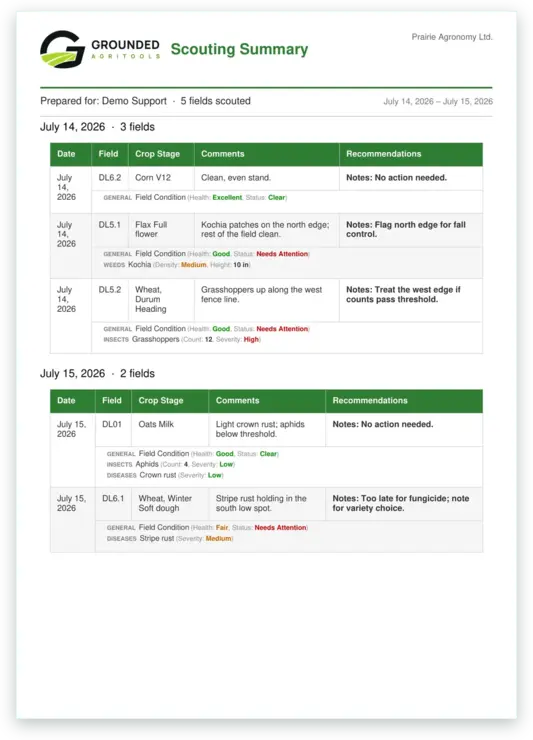
The summary report colour-codes every finding, green when it's clear and amber to red when it needs attention, so your grower takes in the whole season at a glance.
From the field to your grower
Bring your fields in from John Deere Operations Center or Shapefiles, or draw them. Then:
1Mark it on the map
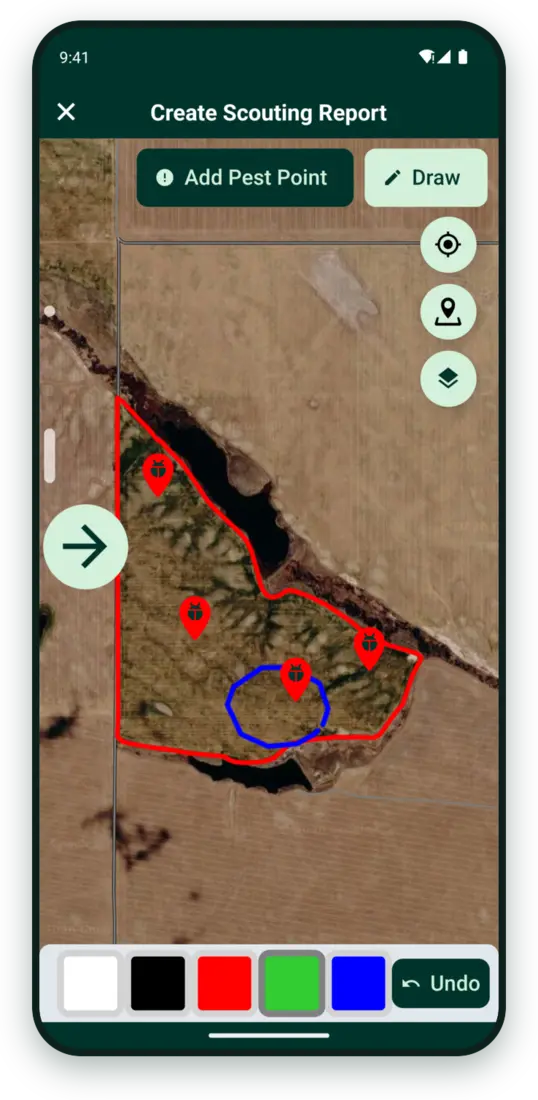
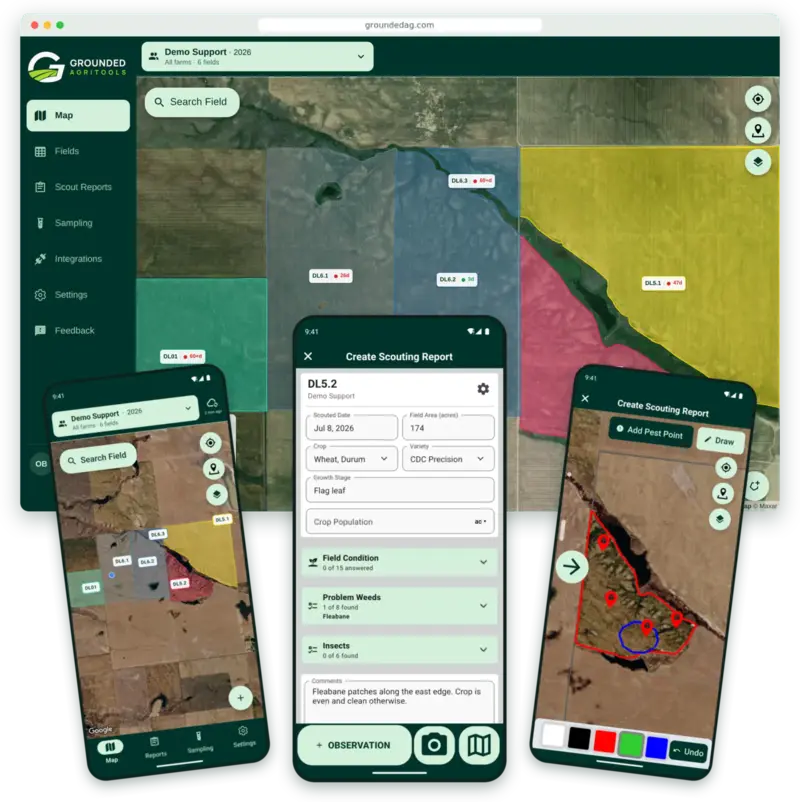
Drop pest points and circle problem areas right on the field.
2Fill in the report
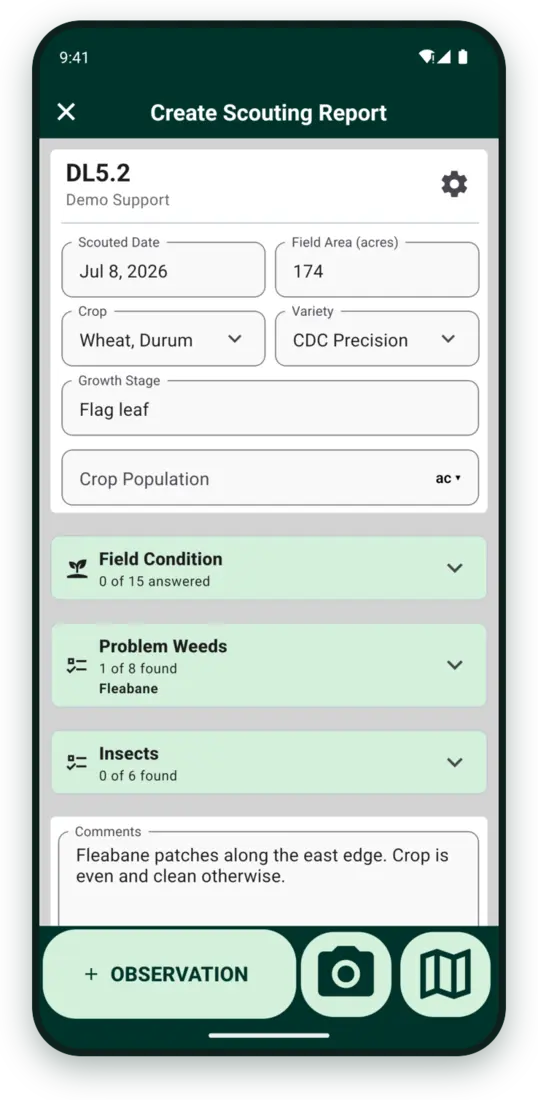
Add weeds, insects and disease, set the pressure, snap a photo. Photos attach to the report as you go. No signal needed.
3Share the report
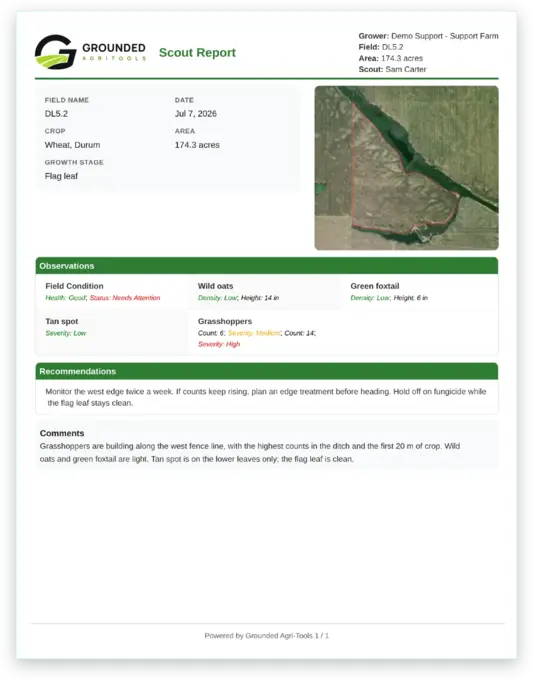
A clean PDF for each visit, with your logo, the map, your photos and your recommendations.
4Send the summary
Batch a week or the whole season into one PDF. The report growers keep.
The summary report growers keep
Each visit is a report. The summary is what wins the grower: all their fields and visits in one PDF, with your logo, photos and recommendations. Every finding is colour-coded, green when it's clear and amber to red when it needs attention, so growers see what matters in seconds.
Send it weekly through the season, or once at the end as the record of everything you did for them.
Add your growers to GroundedAg at no cost. They get their own login to see their fields, every report and your recommendations, any time. It's read-only for them: the only things they can change are details like their crop information, so your reports stay exactly as you sent them.
NEW Soil and tissue sampling, in the same app. Lay out grid points or zones on a field, walk to each point with your phone, and record it as you go. It's new, and we'd love your feedback: tell us what you'd want from it.
From agronomists using it
"The reporting is a big win. It's quick to complete scouting reports in the field, and the final product looks clean and professional when sent to clients."
"It kept scouting reports all in one location, they were easy to go back on. All scouting reports could be put on to one pdf for the grower."
Questions consultants ask
Does it work without cell service?
Yes. You can start and fill in scouting reports with no signal. They're saved on your phone and sync when you're back in range.
I already have a system that works.
Try it on one grower for a week alongside what you do now. If the reports aren't faster and better looking, you've lost nothing: it's free for up to 5 fields, with no credit card.
Can I make the form match how I scout?
Yes. Build your own forms from the pests you look for and your own questions, like soil moisture or crop stand, and set crop-specific forms that come up automatically for that crop. Describe the form you use now, or attach a photo or PDF of your paper form, and the assistant builds it for you. Or skip all that: the standard form works on day one.
How do my fields get in?
Connect your John Deere Operations Center account and pick the fields, upload Shapefiles, draw a boundary on the map, or search by legal land description.
What do I need to pay for?
One Organization licence covers you: it comes with your own user. Every report, single visits and summaries alike, and as many growers as you work with.
What does my grower need?
Nothing. You share the PDF with them, by email, text or however they like. You can also add them at no cost, with their own read-only login on the phone app or the web: their fields on the map, coloured by crop and showing what you found, plus your reports and recommendations. They can update details like their crops, but never change your reports.
Who owns my data?
You do, and we never sell it. Reports export as PDFs and your fields list exports to CSV. Ask and we'll delete it.
Message us any time
You'll reach the people who build GroundedAg, not a support queue. Leave your number and we'll call you back. Whatever the problem, we'll stay on it until it's sorted out.
Email admin@groundedag.com or send us a message.
Book a free setup call and we'll bring in your fields and walk through your first report together.
Your next report could be done before you're back in the truck
Set up your first field today and scout it tomorrow.